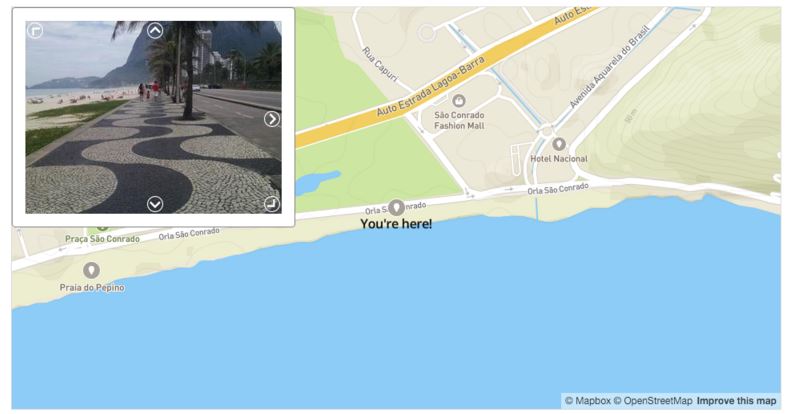
Today we’re happy to announce our new stand-alone viewer, MapillaryJS, and make it available for everyone. MapillaryJS is our WebGL JavaScript library for displaying street level photos anywhere. With this library, we can standardize our viewing experience across all integrations. MapillaryJS is open source and we’re continuing to develop it with input from all of you.
The incredible collection of photos that the Mapillary community has put together – which currently includes over 50 million photos – should be as useful and dynamic as possible. Our goal with MapillaryJS is to enhance maps and help better visualize GIS information by making street level photos available on all platforms and all services.
Platform-agnostic, powerful viewer
At Mapillary, we’re committed to building the best photo representation of the world and providing those photos and data for anyone to use, regardless of what mapping tools people use. We’re completely agnostic to what platform works best for you. We ♡ OpenStreetMap but you may have other needs or requirements, for example connecting with your GIS data through our ArcGIS solution, or using a native mobile app on iOS/Android.
MapillaryJS is meant to be easy to use on any map platform, be it OpenStreetMap, Mapbox, Esri, Google, Apple, Here… you name it. Our documentation has examples for all of them. At Mapillary we are going to use MapillaryJS everywhere; in our apps, our editor, and in our widget to begin with.
By breaking the viewer out into a simple stand-alone component, we can make sure that every integration gets the same powerful features in terms of photo navigation, object detection, 3D object rendering, and whatever we cook up next. No extra work for you!
Simple integration
Here’s how to create a Mapillary viewer and set some basic parameters.

You can easily customize behavior and load additional modules (see the documentation for details). We built MapillaryJS to be modular with a small, lightweight basic viewer that can be extended to display traffic signs, 3D and a lot more.
What’s coming
We’re starting out with support for a WebGL component with 3D transitions, unified navigation, panoramas, HTML canvas rendering as fallback, a cover feature, and showing detected objects. Next up we’re adding point clouds, smoothed trajectories, and dragging functionality to be able to completely remove the old viewer from Mapillary.com.
Since MapillaryJS standardizes our work on one single viewer all client integrations will have access to our upcoming features. Currently in the plans are object tagging, rendering map markers, rendering full 3D models, and dynamic journeys. Let us know if you have any requests by filing an issue on GitHub.
Contribute to MapillaryJS
We’re inviting everyone to contribute, give feedback, suggest features, make your own forks of MapillaryJS. Head over to the project page or take a look at the code (MIT license).
We are excited to see where the Mapillary viewer ends up! As always, we appreciate your thoughts or feedback on how you want to use Mapillary and what we can do better.