There’s another free viewing on the block… this one comes from Autodesk and it supports DWG and DXF! View and plot DWG and DXF files, and then publish them as DWF files for quick and easy review and markup in Autodesk DWF Composer. We take a Quik Look at the functionality provided in the latest offering from Autodesk.
Share AutoCAD drawings easily and accurately among engineers and architects with DWG TrueView… And you’ll always get full drawing fidelity because the DWG viewer is built on the same viewing technology as AutoCAD® 2006 software. (Source: Autodesk)
So, how does this product differ from the DWF Viewer? Simply put, TrueView enables users to work/view directly with DWG and DWF formatted design data. Unlike the DWF Viewer, users can use this tool to work with their CAD data in native Autodesk design format… but hold on… it enables users to push their data out and share it in DWF… sweet! Installation is a snap once you grab the free 109MB download!
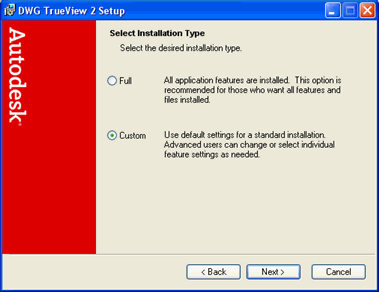
System Requirements
Appropriate hardware and graphics cards are required to run DWG TrueView™:
Intel® Pentium® III processor or later, 800 MHz
Microsoft® Windows® XP Professional or Home Edition (SP1 or SP2), or Windows 2000 (SP4)
512 MB RAM (recommended)
300 MB free disk space for installation
1024×768 VGA with true color (minimum)
Mouse, trackball, or compatible pointing device
Microsoft Internet Explorer 6.0
Microsoft® Windows® XP Professional or Home Edition (SP1 or SP2), or Windows 2000 (SP4)
512 MB RAM (recommended)
300 MB free disk space for installation
1024×768 VGA with true color (minimum)
Mouse, trackball, or compatible pointing device
Microsoft Internet Explorer 6.0
Functionality and Supported Features:
Support for DWG and DXF file formats
Provisioning for pan, zoom, and navigate sheets
Toggle layers on/off
Plot / Print files
Plot to large format output
Publish to DWF
Provisioning for pan, zoom, and navigate sheets
Toggle layers on/off
Plot / Print files
Plot to large format output
Publish to DWF
Note the image of the toolbar provided below. Users have quick and simple access to the following commands (left to right):
open, plot, publish, pan, zoom, zoom window, zoom previous, named views, 3D orbit, layer properties.
open, plot, publish, pan, zoom, zoom window, zoom previous, named views, 3D orbit, layer properties.
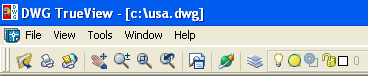
Commands are also available via the pull down menus. Menus are categorized as File, View, Tools, Window, Help.
Publishing to DWF is a nice score as this enables users to collaborate and share their digital design data with users of the free and popular ). Recall DWF Viewer is the robust viewing client designed for file sharing, particularly useful for the “non-CAD” user. Those users needing to add detail to their DWF formatted design data are encouraged to look at the DWF Composer product which enables even greater functionality including redlining, support for raster data, and other publishing and annotation capabilities.
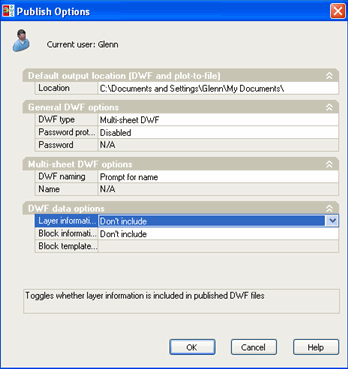
Numerous publishing and printing options are available. Additionally, users can output as SWF and assign password protection to sheet sets and drawing files.
Looking a bit deeper at the pull down options, users will find some interesting functionality.
Page Setup – you’ll find more plotting/printing preferences available here including the ability to publish to DWF, JPG, or PNG. You can also select from a long list of common paper sizes (A,B, C, D, and all common architectural paper sizes). Plots can be scaled to fit paper size of a preferred output scale factor can be input (i.e.. 1:24,000). Existing AutoCAD drawing template files (PWT) can be referenced, and plot setup parameters can be saved for future reference
Publishing as a DWF or DWF sheet set is easily accomplished and once again, additional support and options are available via the Publish / Options selection. These include the ability to assign password protection to your DWFs.
Viewing options are quite substantial and are all accessible via the View menu pull-down. 3D viewing can be selected should you have elevation data assigned to your data. Once enabled, rotating around and tilting the data is possible to provide some nifty effects (see below).
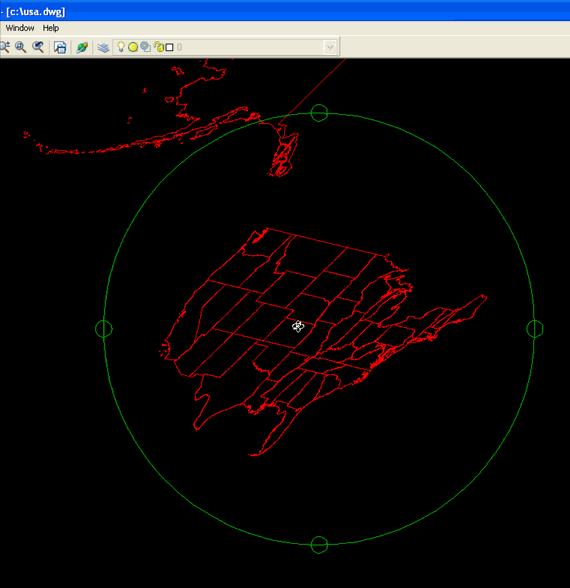
Using the 3D view option to tilt our data
Configurable Options are quite plentiful once you select the Options menu item. Setting for file search paths, default fonts and printers, and default file saving path are specified here. Display setup options such as show tool tips and default colors are defined under the Options / Display setup item.

The TrueView Options Pane lets users cutomize preferences
I found that out of habit I wanted to enter keystroke commands via the command line, which is non-existent. Actually, it’s there but you can’t enter any keystroke commands.. sorry! Obviously this means that there’s no draw menu option and draw/edit commands are not included. To view, publish and share DWF and DXF data this product is a nice score. It complements the DWF product lineup nicely and extends Autodesk’s vision to help users share their digital design data.