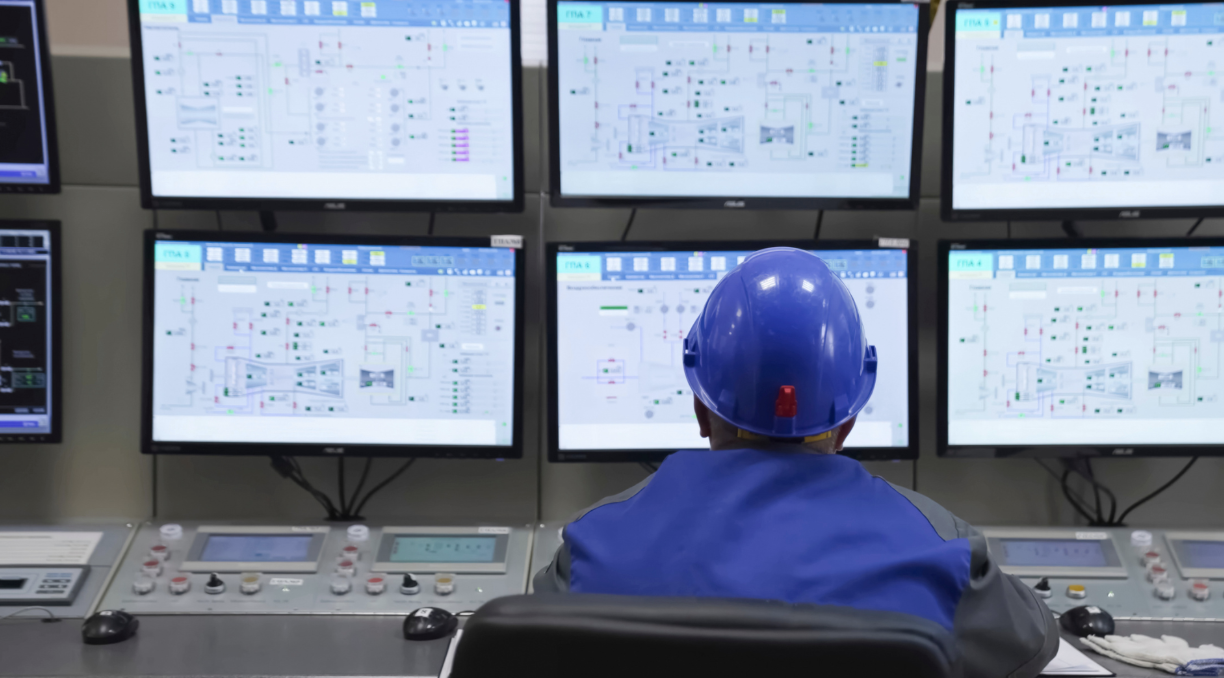
GIS monitoring centers never sleep. Operators are glued to consoles around the clock, scanning multi-screen setups, interpreting live spatial data, and making split-second calls on incidents that genuinely matter. Hours into a shift, when the body starts to fight the workspace, judgment suffers.
A 2025 study found that 76% of control room operators report moderate to high fatigue during or after shifts, up from 58% in 2020. That’s not a minor inconvenience; it’s a direct threat to performance and safety that smarter console design can actually fix.
Matching Ergonomic Consoles to What GIS Centers Actually Need
Every second counts in a GIS monitoring center. Delayed response has real consequences, missed incidents, slower coordination, and asset loss. In this context, ergonomics isn’t about lumbar pillows and wrist rests. It’s about engineering each console, display angle, and input device to match how an operator physically works through a demanding shift. Professionals who start digging into ergonomic furniture quickly realize that control room-specific solutions operate at an entirely different standard than anything found in a conventional office supply catalog.
Solid ergonomic control room design begins by mapping actual operator tasks, reach patterns, visual scanning habits, and alarm workflows directly onto console geometry. It’s a deliberate process, not a product purchase.
What Makes a GIS Monitoring Center Different
You’re not dealing with casual knowledge workers here. GIS operators handle 24/7 incident response, real-time asset tracking, and continuous situational awareness. They make map-driven decisions under pressure, shift after shift. That cognitive intensity makes physical comfort a hard operational requirement, not a perk.
The Performance Dividend from Getting Consoles Right
Well-configured consoles speed up incident response, cut error rates, and protect operator health over years of extended shifts. They also help organizations meet ISO 11064, the internationally recognized benchmark for control room design. When the workspace fits the work, performance follows naturally.
What Ergonomics Actually Means in a GIS Context
Here’s a distinction worth making clearly: ergonomics in a GIS monitoring center isn’t the same animal as ergonomics in a standard office. You’re dealing with continuous shift schedules, alarm overload, and simultaneous processing of spatial and visual data, none of which show up in typical office ergonomics literature.
Core principles still apply: neutral posture, visual comfort, defined reach zones, and environmental control, but they translate into far more demanding console specifications. For a GIS operator, that means accounting for constant map panning, frequent layer toggling, and managing multi-screen alarms without losing situational awareness. Every design choice either supports those repetitive, high-stakes interactions or quietly undermines them.
How Console Design Actually Changes Performance Outcomes
Poorly designed workstations don’t just make operators uncomfortable. They degrade situational awareness, slow response times, and push error rates up measurably.
Cutting Cognitive Load When Information Is Everywhere
Multi-screen GIS setups can overwhelm even experienced operators when displays aren’t arranged to match natural visual scanning patterns. Thoughtful console layout simplifies how the brain builds its mental model of what’s happening. Critical geographic data stays front and center. Searching for information drops. Decision speed improves.
Protecting Operators from Physical Wear Over Long Shifts
Neck strain from oversized wall displays, lower back pain from static postures, wrist discomfort from prolonged mouse use, GIS analysts deal with all of it. Height-adjustable consoles, proper foot clearance, and well-positioned input devices cut long-term injury risk significantly. The U.S. Bureau of Labor Statistics reported 888,100 cases involving days away from work in 2024. Musculoskeletal injuries remain a major workforce disruption, and most are preventable with proper workstation configuration.
Faster Alarm Recognition, Fewer Mistakes
Console layout shapes how quickly operators spot geographic alarms and respond accurately. Clear sight lines to shared displays, controls within comfortable reach; these aren’t luxuries. They’re the difference between catching a critical event early and missing it entirely, or mis-clicking on a sensitive map layer at exactly the wrong moment.
The Components That Make a GIS Workstation Truly Ergonomic
An ergonomic GIS workstation isn’t a single product you order and install. It’s a carefully integrated system where every component reinforces the others.
What an Ergonomic Desk Actually Means Here
For GIS environments, a proper desk isn’t just adjustable. It needs to be deep enough for mapping hardware, robust enough to carry the weight of multiple large monitors, and equipped with cable management that keeps the workspace functional rather than chaotic. Sit-stand adjustment should be the baseline expectation, not a premium add-on.
Building Out a Full Ergonomic Workstation
Beyond the desk surface, a complete ergonomic workstation for GIS professionals includes adjustable monitor arms, specialized input devices like trackballs or pen tools, operator-specific chairs, supportive footrests, and calibrated task lighting. These elements work as a coordinated system. Pull one piece out of alignment, and the others compensate badly.
Furniture Standards for Round-the-Clock Environments
For GIS centers running continuous operations, the right furniture is heavy-duty, highly adjustable, and standards-compliant. Manufacturers like Tresco Consoles prioritize both operator comfort and practical adjustability because furniture that can’t adapt to different operators across different shifts isn’t really doing its job.
Console Geometry: Getting the Dimensions and Angles Right
Even the best-specified components underperform when the physical dimensions and screen angles aren’t calibrated correctly. This is where ISO 11064 earns its place as the foundational standard.
Sizing Consoles for the Full Range of Operators
Consoles should accommodate operators from the 5th to 95th percentile in height, arm length, and leg clearance. ISO 11064 Parts 3 and 4 define the dimensional ranges that make this achievable. Designing for an imaginary “average” operator means most of your actual team spends their shift working in compromise postures.
Placing Controls Where Hands Naturally Fall
Primary controls, keyboard, mouse, and alarm acknowledgment devices belong in the inner reach zone, accessible without leaning or twisting. Secondary controls can sit further out. For GIS operators navigating maps for hours at a stretch, this placement prevents the gradual strain accumulation that doesn’t hurt today but absolutely does after six months.
Screen Distance, Angles, and What Goes Where
Most monitors work best between 20 and 30 inches from the operator, with the top of the screen at or just below eye level. Central displays should show the highest-priority GIS maps and alarms. Peripheral screens handle logs, reference feeds, and communication tools that don’t require constant visual attention.
Environmental Factors That Quietly Affect GIS Operator Focus
Here’s something that often gets overlooked: even a perfectly calibrated console can be undermined by the environment around it. Lighting, acoustics, and temperature have a real and measurable impact on operator concentration and fatigue across long shifts.
Lighting That Works With Map Displays
Glare and reflections on high-resolution map screens are among the most common and most fixable comfort problems in GIS centers. Indirect ambient lighting combined with adjustable task lighting lets operators distinguish color-coded map layers without eye strain, building steadily through the shift. It sounds like a small thing. After eight hours, it absolutely is not.
Keeping Noise and Temperature in Check
HVAC hum, background conversations, and equipment noise all compete with an operator’s focus. Sound masking and acoustic panels near consoles deliver measurable results. Temperature matters too; overly warm rooms accelerate fatigue faster than most managers expect, while well-circulated, cool air supports the kind of sustained alertness GIS monitoring demands.
Configuring an Ergonomic GIS Workstation: Where to Start
A systematic configuration approach, desk, monitor, and device placement working in sequence, is far more effective than making isolated adjustments and hoping for the best.
Start with console surface height. Elbows should rest at roughly 90 degrees with shoulders relaxed. Set the monitor distance next, then tilt each screen to face the operator directly. For curved multi-monitor arrays showing GIS dashboards, maintaining consistent focal distance across screens prevents the eye fatigue that builds from constantly refocusing between displays.
Keep keyboards and mice close enough to avoid forward reach. Specialized GIS tools, such as trackballs, pen devices, and 3D mice, belong in the primary reach zone when they’re used frequently. Asymmetric postures from overreaching are one of the most common and least acknowledged injury contributors in GIS workstations. Chair height should align with the console surface. Lumbar support should contact the lower back naturally. Footrests become essential more often than operators initially expect.
Scaling Ergonomics Across an Entire GIS Monitoring Center
Individual workstation improvements matter. But the full performance impact only emerges when those same principles extend to the layout and design of the entire center.
Drawing on ISO 11064-3, a well-planned GIS monitoring center separates quiet analysis zones from collaborative incident cells and supervisor stations. Traffic patterns allow free movement without disrupting active monitoring. Operator rows and shared wall displays should be oriented so team members can see each other and key screens without twisting while still maintaining enough visual privacy to avoid the stress of constant surveillance.
For 24/7 shift work, consoles need fast individual adjustability memory presets that let an incoming operator restore their preferred configuration in seconds. Sit-stand transitions and varied posture opportunities reduce fatigue accumulation across consecutive shifts. Console design either enables those behaviors or makes them impractical.
Standards That Keep GIS Console Design Grounded
Good intentions aren’t a design methodology. ISO 11064 Parts 3 through 6 cover layout, workstation dimensions, display placement, and environmental requirements, providing the structural framework that keeps console design anchored in human capability rather than engineering convenience.
Human factors research consistently links workstation usability with error rates in control room environments. For GIS operations involving geo-fenced alerts, real-time tracking, and field coordination, applying those findings to console layout directly reduces both the frequency and severity of operational mistakes.
When evaluating vendors, documented ISO 11064 compliance, verified anthropometric range support, and published load capacity data aren’t optional extras. Vendors who can’t produce this documentation are unlikely to deliver consoles that hold up in demanding 24/7 GIS environments.
What’s Coming Next in GIS Console Design
The next generation of ergonomic consoles isn’t just better furniture; it’s a smarter infrastructure that actively supports operator performance rather than passively accommodating it.
Height-adjustable consoles with programmable presets let operators shift between seated analysis and standing briefings without losing their display configuration. That flexibility matters most during extended incidents. Research confirms workstation interventions can reduce prolonged sitting by 26 minutes per day, a meaningful shift in long-term health outcomes.
Ultra-wide curved displays and high-pixel-density video walls reduce neck rotation and create more consistent focal distance across the operator’s field of view. The GIS market is projected to reach USD 31.8 billion by 2031, at a CAGR of 13.94%. That scale means more operations centers will need purpose-built solutions, and the industry is responding.
Emerging console systems incorporate sensors monitoring posture, seat time, and micro-break patterns. When integrated with building systems, they adjust lighting and temperature automatically at active workstations. Modular designs built for reconfiguration and reuse, energy-efficient display integration, and GREENGUARD-certified materials are increasingly expected in procurement specifications, not just appreciated.
How to Build the Business Case for Ergonomic Console Investment
Ergonomic consoles aren’t discretionary spending. They’re operational infrastructure with measurable returns.
Ergonomic upgrades improve incident detection speed, reduce map interpretation errors, and support faster coordination during high-stakes events. When operators aren’t fighting their workstations, they direct more cognitive capacity toward the actual mission. Direct savings include reduced absenteeism, fewer musculoskeletal injuries, and longer equipment life. Indirect value shows up in operator retention, morale, and service-level improvements that are harder to quantify but very real.
A phased approach: pilot console first, refine based on operator feedback, then scale to reduce risk and build internal confidence. Consoles designed with modularity can adapt to future GIS tools and AI-driven analytics without requiring a full replacement cycle.
Final Thought
Your GIS monitoring center’s performance is shaped, shift by shift, by the physical environment operators work in. Ergonomic consoles aren’t furniture upgrades; they’re foundational infrastructure.
Start with an honest ergonomic audit, prioritize the changes that deliver the most impact, and involve your operators throughout. The centers that get this right don’t just run more comfortably; they perform better when it matters most.
FAQs
- Why are ergonomic consoles critical in GIS monitoring centers?
They directly impact operator performance by reducing fatigue, improving situational awareness, and enabling faster, more accurate decision-making during high-pressure, real-time operations. - How do ergonomic consoles improve productivity in GIS environments?
By optimizing screen placement, reach zones, and posture support, they reduce cognitive load and physical strain, allowing operators to focus on interpreting spatial data and responding quickly to incidents. - What standards should be followed when designing GIS console workstations?
ISO 11064 is the key benchmark, covering control room layout, workstation dimensions, display positioning, and environmental factors to ensure safety, efficiency, and long-term usability.