For decades, PowerPoint presentations have been a popular tool to share and communicate various business information, and they’re still reliable in the digital business world. Many professional discussions and presentations are made easier by PowerPoints, from a small office work meeting to a remote work videoconference to a crowded TED Talk, and more.
You can easily record Presentations in PowerPoint, save, and share later. By sharing it on supported social media sites, you can reach out to more customers, colleagues, and friends. This also lets your audience examine presentations at their leisure without missing any crucial information.
In this guide, you’ll learn the secret to recording professional presentations on PowerPoint which is taught in Microsoft PowerPoint training with the help of our free video presentation recorder
How to Record a Presentation on Powerpoint for Business in Minutes?
According to business experts and professionals, the most effective online presentations show your PowerPoint slides and the presenter. Before recording your PowerPoint presentation, prepare the presentation details, gather the necessary tools and rehearse.
A well-crafted and recorded video PPT presentation helps reduce the narrator’s anxiety by drawing the audience’s eyes onto the screen. That’s why you need a third party to help you custom design visually appealing and engaging business presentations.
SOOOMUS- The Secret to Recording a Presentation on Powerpoint for Business.
SOOMUS PowerPoint presentation and recording software allow companies to showcase their strategy and sell-out business proposition, whether it’s a sales growth PPT, fundraising PPT, analyst presentation, live video conference PPT, elevator pitch, or finance PPT.

With SOOMUS, you can upgrade your presentation using stunning visuals presentation available at your fingertips. You’ll also find creating a presentation is simple and time-saving, thanks to its intuitive user interface and a rich library of ready-made templates.
SOOMUS various professional presentation templates can help you record a video presentation instead of starting from scratch. It’s a blueprint for recording a successful business PowerPoint presentation highlighting the key points in the content. And just like that, the pressure is off, and you don’t have to do all the work.
Suppose you already have a PowerPoint presentation that you wish to improve. In that case, you can import it into SOOMUS, select your preferred template, open it, edit, and customize it to fit the company’s culture.
SOOMUS lets you use a bunch of creative effects to customize the templates further. You can add music, texts, stock photos, fonts, GIFs, videos, annotations, business logos, and 3-D imagery using SOOMUS capabilities for free.
The professional audience tends to be more analytical when deriving the presentation’s meaning than the average viewer. Therefore, consider using graphics, lines, and bar charts to convey the crucial statistics that reinforce your point.
Download SOOMUS and gain a free ticket to create a professional PowerPoint presentation
Features that make SOOMUS Suitable for Business Presentation
- Genuine Virtual Background
SOOMUS virtual video background brings you and your colleagues together and feels connected beyond the computer screen. It also helps protect your privacy and remove unwanted objects or people from the recording or live conference videos.
- Robust Visual Effects
You can use SOOMUS built-in visual effects such as colours, texts, captions, images, infographics, animation, sounds, and annotations to get creative and make your Powerpoint business presentation look more professional.
- Easy Conference Launch
Connect SOOMUS to any supported video conferencing software such as LARK, Skype, ZOHO, ZOOM, DISCORD and keep your clients and co-workers engaged anywhere, anytime.
- User-friendly interface
You don’t have to be an expert to use SOOMUS. Its interface is very intuitive, making it easier to use and smoothly record amazing professional Powerpoint presentations.
- PPT file importing
PowerPoint works directly with SOOMUS. All you need to do is import the file and record your business presentation audio and video to slides.
- Flexible screen settings
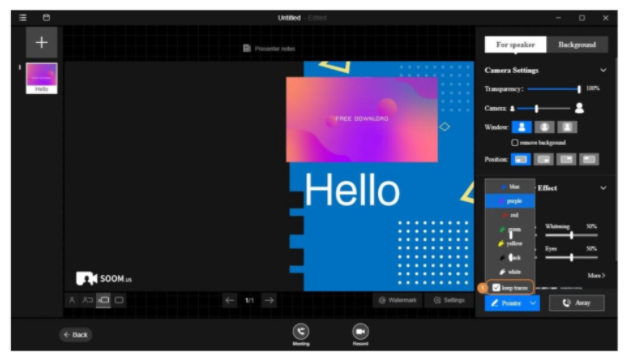
SOOMUS offers four presentation modes: overlay big, overlay small, presenter only, and content only. Each of these modes has its advantages. You can switch between different presentation modes when your SOOMUS account is in editing mode, recording a video or in a live meeting session.
- Customizable templates
SOOMUS versatile, modern templates are the best way to kick start your presentation. You can easily customize these templates in minutes.
- Easily accessible
People love to spend most of their time on phones, watching videos. That’s why SOOMUS allows users to upload their presentations to YouTube and other social media outlets, making them easily accessible anytime, anywhere.
How to Make a Professional Presentation on PowerPoint Quickly
To successfully record a PowerPoint presentation with SOOMUS, you need a microphone, PC, or laptop with a built-in webcam, working sound card, and a quiet place.
Now, let’s walk through the steps to create a professional PowerPoint presentation from SOOMUS’s PPT templates.
Steps to use SOOMUS
Step 1: Search for SOOMUS in your web browser, download, and install the app just like any other installation process.
Step 2: Follow the instructions on the screen to create an account with your ID and email address. Then, sign in to your SOOMUS account by pressing the login button or using your Google or Facebook account.

Step 3: Import your PowerPoint presentation.
a). Open the main window, click Import PowerPoint, select and import a PowerPoint presentation directly from your PC to SOOMUS.
b). Alternatively, click Add on the top-right side, followed by PPT, to import the presentation while in editing mode.

Step 4: Select your presentation templates and customize your slides by adding scene pages, pictures, texts, annotations, virtual backgrounds, effects to prepare, and other elements to prepare what you want to record.

Step 5: Check if your PC camera and microphone are present and selected. Proceed to click Start Now to record your PowerPoint presentation or launch a live meeting. Save every slide before moving to the next.
Why Use SOOMUS Video Recorder to Record a Presentation on PowerPoint for Your Business?
Clients and employees can use the SOOMUS PowerPoint presentation and recording tool for all business projects. Below are reasons why SOOMUS is an important business material.
- It establishes a stable video environment for creating brand guide visually appealing instructions for distributors to flip through and get their work done effectively.
- Using SOOMUS visual effects to add photos, texts, real shots, animations, or statistics can help communicate your business proposal to partners and persuade clients to make a deal.
- With the help of SOOMUS, you can launch a real-time meeting with clients or colleagues using videoconferencing tools such as Zoom or record a stunning video to deliver a good presentation.
- SOOMUS templates can help you add infographics, color images and an inlaid pointer function to stress key presentation content in seconds. Infographics are a great way to highlight ideas and impress a professional audience.
- Presentation upload is quick. SOOMUS allows users to upload and share recorded presentation videos to Youtube and other supported social media platforms.
- SOOMUS solid software powerful features, including customized templates or training courses, simplify presentation recording and improve employees’ work performance.
- Recording a Powerpoint presentation with SOOMUS provides the best avenue to deliver company new policies, announcements, monthly reports, sales glories, training resources directly and effectively.
- Slideshows are also the perfect way to present products’ features in trade shows or online channels. They attract audience attention and enable customers to see product quality all over the world.
- Whenever you panic to generate your end-year report, simply launch SOOMUS to display sales growth and unrealized market potential data.
- SOOMUS breaks through the time and the distance limit using a live video-conferencing feature to help companies reach diverse job markets for a more efficient recruitment process.
Conclusion
You’ve just learned how to record a presentation on PowerPoint for business using SOOMUS professional PowerPoint presentation and recording tool. SOOMUS templates push you ahead in the process and help you record the perfect presentation. If you still don’t have the app, download it for free and install it on your computer right now.