From all-new Office 365 social and personalized experiences to new opportunities for developers, Microsoft emphasizes cloud scenarios that change the way people get things done.
Microsoft Corp. kicked off its SharePoint Conference 2014, highlighting new ways Microsoft Office 365 will enable people to accomplish more with new experiences for users, developers and IT pros. In a keynote speech to approximately 10,000 customers and partners, Microsoft Corporate Vice President Jeff Teper showcased innovation that brings together the power of the cloud, enterprise social, big data, machine learning and mobile capabilities into an experience made personal for every Office 365 user. These new technologies will enable a networked way of working together in teams, in groups and across organizations that can result in better customer responsiveness, collaboration, information sharing, discoverability and more.
“Today, the world has become a giant network where connections make information more relevant and people more productive. Most companies, however, are not working like a network, which we believe is vital for their ability to improve collaboration and respond to customers, competition and market changes,” Teper said. “The new Office 365 experiences powered by cloud, social, mobile and big data technologies enable people and teams to find the right connections and most relevant insights to get more done.”
Delivering on this vision, Microsoft showcased new innovations for end users, developers and IT pros coming to Office 365 in the near future, with an emphasis on the trusted platform fundamentals of security, privacy and industry compliance.
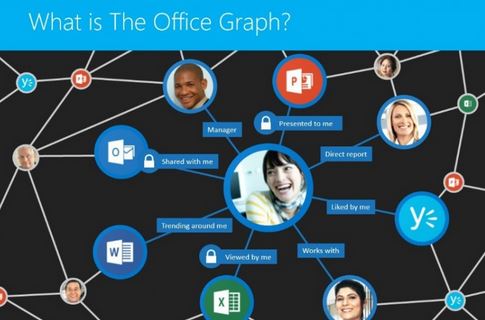
For end users, Microsoft demonstrated new personalized experiences that integrate social capabilities throughout Office 365, to help people spend less time trying to find information or looking for people working on similar projects and more time getting things done. Powering these new user experiences is the Office Graph, a new Microsoft Office 365 support intelligence fabric that remains unseen to the user but is constantly analyzing content, interactions and activity streams and mapping the relationships using machine learning to intelligently connect and surface the most relevant content to each user. These new experiences include the following:
- “Oslo” (code name). A new application powered by the Office Graph and code-named “Oslo” was previewed onstage. It uses personal interactions and machine learning to surface a view of the most relevant, timely information for each individual using Office 365 across SharePoint, Exchange, Lync, Yammer and Office.
- Groups. Groups is a new feature unifying people, conversations, calendars, emails and files across the Office 365 suite, enabling a seamless collaboration experience across applications. Creating a Group anywhere in Office 365 will automatically provision a corresponding Yammer conversation feed, calendar, document library and inbox where members can collaborate and work as a team. Just like in Yammer, Groups are open by default but can be made private if necessary, enhancing discoverability and sharing.
- Inline Social. Microsoft is bringing the power of social collaboration and conversations to everyone by offering Inline Social experiences throughout Office 365. The first experience planned for introduction is the ability to have social conversations inside documents stored in SharePoint Online and OneDrive for Business.
- Office 365 Video Portal. Today, Microsoft previewed the new Office 365 Video Portal to support upload, storage and discovery of videos in a secure manner. Businesses will be able to categorize videos into channels for specific business needs and stream them on mobile devices, with all of the video compression, optimization and rendering work done by Office 365.
“Many organizations struggle with bringing together their content creation, collaboration and core business applications,” said Alan Lepofsky, vice president and principal analyst, Constellation Research. “Today’s Office Graph and ‘Oslo‘ announcements describe an integrated future that could greatly improve the way Microsoft Office 365 users will get their work done, with easily discoverable insights about important activity across their organizations that personally affect or may be interesting to them.”
With more than 3.4 million Office and SharePoint developers and counting, Microsoft also announced investments that open more doors for customers and partners to build contextual productivity solutions across browsers, PCs and mobile devices. On the Office 365 platform, developers can build integrated solutions and mobile apps to reach today’s leading businesses.
- Exciting mobile possibilities. Today, the release of Office 365 SDKs for Windows 8 and Android will help developers build mobile productivity solutions powered by Office 365. Windows and Android developers can now connect to Office 365 data and services, including files, calendars, contacts, tasks and email.
- Seamless Office 365 integration. Enhancements to Office 365 APIs for PowerPoint and Outlook give developers the control to build new, sophisticated solutions. PowerPoint presentations can be extended to surface poll or survey data directly within a deck, and Outlook Compose apps offer helpful insight alongside an email as it is written.
- Robust APIs. In a continuation of Office 365 API growth, new APIs for files, people, email, calendar and tasks bring new light to the service with an intuitive, open- standards approach. The APIs also feature popularly requested enhancements, including self-service site provisioning and support for OneDrive for Business file actions.
- Sharing power. Office 365 documents that include app information can now be more seamlessly activated by recipients. PowerPoint apps travel into the PowerPoint Online experience, allowing customers to share their favorite apps in a more viral way. Later this year, Office Online will bring similar capabilities to Excel.
For IT pros, Microsoft announced new capabilities that enhance Office 365 security and privacy, giving IT pros the tools they need to help protect their organizations. In addition, with the Office 2013 and SharePoint Server 2013 Service Pack 1 release, it is now easier than ever for organizations to take advantage of Office 365, whether that means making a comprehensive move to the cloud, adopting a hybrid deployment, or making a gradual transition through easy on-ramps such as OneDrive for Business and Yammer. Learn more about Microsoft 365 Migration and Microsoft SharePoint Migration.
- Data-loss prevention. Microsoft demonstrated new data-loss prevention capabilities for Office content, enabling organizations to manage, track and audit content, while not getting in the way of user productivity.
- OneDrive for Business. In April, businesses can purchase OneDrive for Business (formerly SkyDrive Pro) as a stand-alone SKU providing secured file, sync and share in the cloud with all the benefits of integration with Office. Also, with SharePoint Server 2013 Service Pack 1, Microsoft introduced new admin controls to “turn on” OneDrive for Business in the cloud directly from the SharePoint Server 2013 admin console. This enables customers to keep their on-premises infrastructure intact, while still getting the benefit of cloud-based file storage and sharing.
- Easy SharePoint social transition to Yammer. In Service Pack 1 Microsoft is making it easy for IT pros to replace the out-of-the-box SharePoint Server 2013 social experience with Yammer. Through simple controls in SharePoint Server 2013 central administration, IT can choose to activate Yammer, redirecting users to the organization’s Yammer network.
More information about today’s news can be found on the Microsoft Office blog.
The SharePoint Conference 2014 is the largest Microsoft SharePoint event in the world, offering developers, IT professionals and executives a range of presentations, workshops, Q&A sessions and networking events. More information on the news at the event can be found at the Microsoft Office virtual pressroom.