Stellar Converter for EDB is an ideal application for Exchange Administrators to have in their arsenal of maintenance and Exchange Server support tools. The application allows to view and extract data from an Exchange Server database.
Normally, if you have an offline mailbox database of an old Exchange Server or your Exchange Server suffered an unforeseen failure which ended up with the operating system not booting issue, it would not be possible to extract data directly from the EDB file by using the native tools. Also, from a decommissioned Exchange Server, you will not be able to extract the data manually.
Situations when you need an EDB to PST converter tool:
- Need ExMerge and New-MailboxExportRequest Alternative
- Access old EDB data
- Need to backup Exchange mailboxes
- Archive mailboxes without database dismount
- Need to back up some specific mailboxes or emails
- Want to move selective mailbox data to another Exchange Server
Although you can extract data using the New-MailboxExportRequest or Outlook, you would need to have the Exchange Server working at the best and the databases mounted. If this is not the case, you will not be able to export any data.
Here is where Stellar Converter for EDB comes in handy as it allows to export the data with no issues and with minimal time possible.
The installation of the application is very easy. It just requires a Windows 10 installation or a server operating system. The installation file is about 30 MB in size.
Once you open the application, you will be presented with the screen to choose your mailbox databases. The application can open any version of Exchange Server database – from 2003 till 2019, which is basically every Exchange Server database. The database can be a live database (mounted) or an offline database. You can open a single database or even more than one database, which don’t have the transaction logs. For example, you can export an EDB file from an old, decommissioned server which is not of the same version of your current setup. In fact, you don’t need an Exchange Server installation to export an Exchange database.
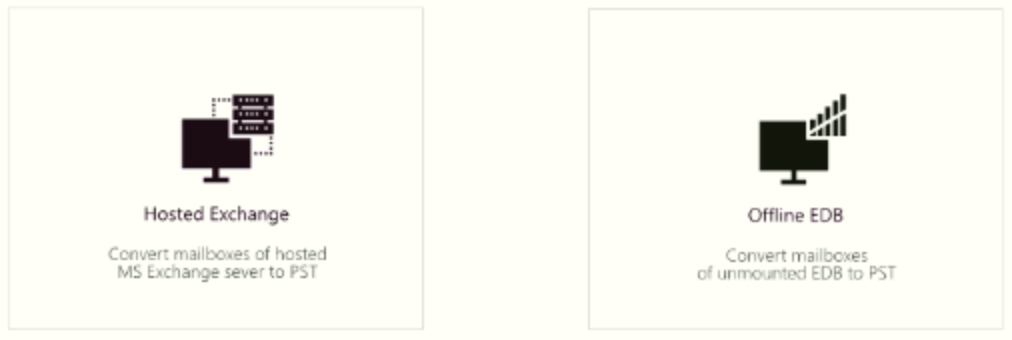
On the next screen, you will be shown the file selection, in case you’ve selected the Offline EDB. Here you can specify directly the EDB file. Or, you can use the Find option, which will search for EDB files in the drive you specify. You can also specify the temporary path to be used for workings.

Once opened, the file will be briefly scanned. The application will immediately show the whole structure of your database. You can browse through all the folders of each mailbox in your database.

Exploring involves showing all the content of each folder in the list and you can also preview the emails in HTML form.

In the main list, under the header of each column, you have the search row. You can do an in-line search in the fields – From, To, Subject and date. This is a great feature since you don’t have to open extra windows or menus as most of the functionality is in the main screen.
You can also view calendar, contact, and tasks right from the main window by clicking on the icons at the bottom of the window.

These icons allows you to view the calendar entries, contacts, tasks, journal, and other things related to the mailbox.

Once you have selected the mailboxes to export, click on the Save button. You can granularly select the mailboxes from multiple open EDBs.
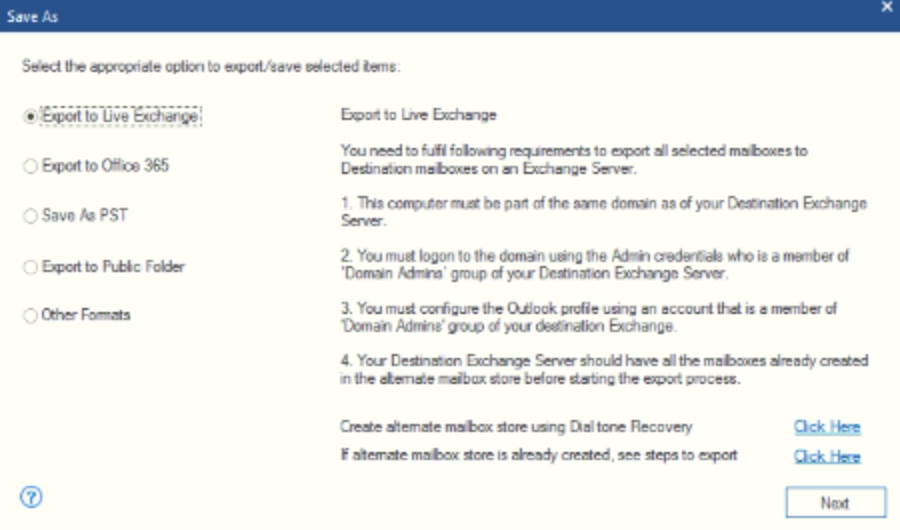
Here you will be given the export selection. You can select Export to Live Exchange, Export to Office 365, Save to PST, Export to Public Folder, and Other Formats (MSG, EML and PDF).
Why would you use the Live Exchange export? This would come in handy when you have to export from a faulty Exchange Server and have rebuilt the setup. You can use this feature to directly export all data back to the Exchange Server. It has several features that help decrease the migration time. You can automatically or manually match the mailboxes which are being migrated to the ones in existence. You can prioritize the VIP users and optimize the export by setting up multi-threading of exports. You can use this when you are migrating from Exchange Server 2010 to Exchange Server 2019 where normally you would make a hop migration to Exchange 2013 or Exchange Server 2016 before going to Exchange Server 2019.
You can use also this software as a migration tool to migrate from your local Exchange Server mailbox database or an offline EDB file to Office/Microsoft 365.
Stellar Converter for EDB comes in three editions – Corporate I, Corporate II, and Toolkit. Each edition comes with instant delivery of the license, free technical support 24×6 and is 100% compatible with any Exchange Server version.
The Corporate I Edition comes with one year subscription and allows 50 mailboxes to export in a single instance. You can export everything to PST, with all the features available in the application. This version is currently priced at $299.
The Corporate II Edition is same as the Corporate I but can be used by multiple users and can export a total of 500 mailboxes. This version is currently priced at $399.
The ultimate version is the Toolkit Edition. This offers the same features as the other two versions, except you can export unlimited number of mailboxes. Apart from that, you will be given the Stellar Repair for Exchange software which does the same thing as the EDB Converter, but it can also open corrupted or damaged Exchange Server database. Along with these two applications, you will also be given Stellar Converter for OST which can export OST files to PST for mobility and extraction of data. The bundle doesn’t stop there. It also offers tools to extract mailbox from Exchange Backups and recover password of Microsoft Exchange. This ultimate Exchange Admin toolkit is priced at $699.
Final Verdict
Stellar Converter for EDB is an ultimate application which will surely save anyone from any sticky situation. It is fast and reliable. It can open multiple mailbox databases and export the mailboxes to PST and other formats.