GIS user technology news

News, Business, AI, Technology, IOS, Android, Google, Mobile, GIS, Crypto Currency, Economics

  • Advertising & Sponsored Posts
    • Advertising & Sponsored Posts
    • Submit Press
  • PRESS
    • Submit PR
    • Top Press
    • Business
    • Software
    • Hardware
    • UAV News
    • Mobile Technology
  • FEATURES
    • Around the Web
    • Social Media Features
    • EXPERTS & Guests
    • Tips
    • Infographics
  • Blog
  • Events
  • Shop
  • Tradepubs
  • CAREERS
You are here: Home / Hardware / The Technology Behind the Archer 2’s Extra-Bright IllumiView Display

The Technology Behind the Archer 2’s Extra-Bright IllumiView Display

November 16, 2013 By Editor

These details of the new, rugged, Archer2 handheld come via the Juniper Systems "Get rugged" blog… Katelyn Heiner shares details, specs, and the hottest features of this latest rugged, data collection handheld solution are shared… enjoy!

Perhaps one of the most noticeable features of the Archer 2 is its extraordinarily bright IllumiView™ display. From conducting customer research, we found that the most important “need” listed by our customers was a bright display that could be easily viewed in direct sunlight. So, in designing the Archer 2, we decided to invest in efforts to improve this feature, which I’ll detail shortly.

We have been very excited with how the new IllumiView™ display has turned out. It is brighter and sharper than any of our previous handhelds, and, according to our product manager, Josh Egan, competitor products “don’t even come close.” Customers are astonished at how bright the Archer 2’s display is, and we’ve even had people whip out their smartphones to compare the clarity of the displays.

Here is an untouched photo of the Archer 2, as it compares to our other rugged handhelds. You might be tempted to think that the displays on our other handhelds look poor, but they actually perform very well and have excellent readability in direct sunlight; it’s just that the Archer 2’s IllumiView display is that good!
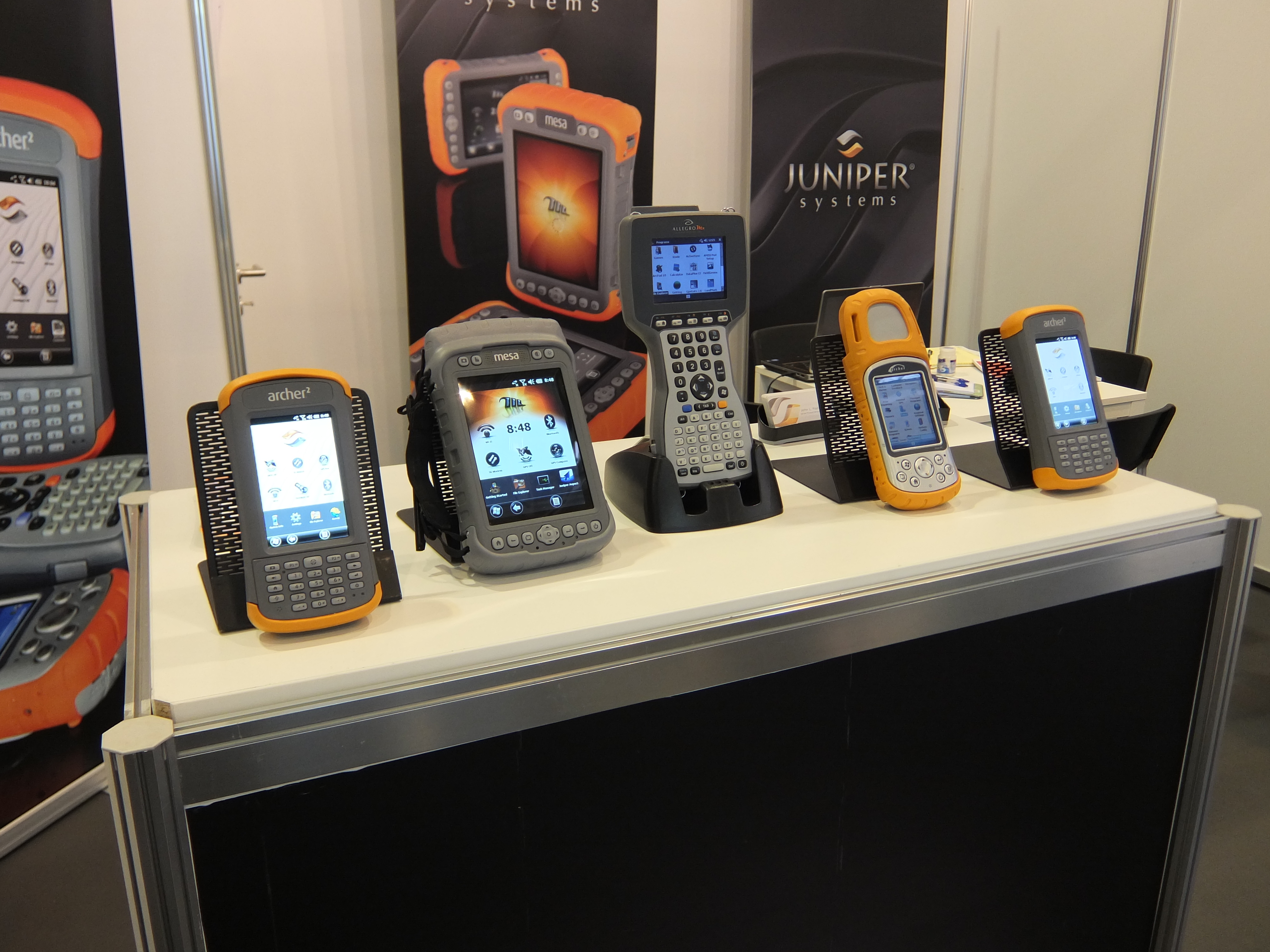
Super bright Archer 2 display

So what’s the story behind this super display? Below, I’ve described the efforts and technology that went into our pursuit of the best display in the industry.

  1. First, we went on a search for the best display we could find from manufacturers around the world. We sifted through many options until we were satisfied with both the display and the manufacturer, even if it cost us a bit more; we felt the cost was justified. Now, a great display is only part of the equation. You can have a great display, but, if poorly implemented, it won’t look any better than any other display. In order to avoid this, we took several steps to ensure an implementation that would magnify the display’s potential, listed below.
  2. We switched from using a resistive touchscreen, as we have in the past, to a capacitive touchscreen. While resistive touchscreens have been the prevailing technology used in the rugged handheld industry in the past, capacitive touchscreens have many benefits to offer, and a few manufacturers are beginning to make that transition. Compared to resistive touchscreens, capacitive touchscreens have fewer layers for light to pass through; reducing the amount of light refraction that can occur. Less light refraction means improved luminance and clarity, which is what we were going for. Capacitive touchscreens can increase a display’s brightness about 20% over resistive touchscreens.
  3. The third major element that went into creating the IllumiView display is called optical bonding, a special method of fusing the display with the touchscreen. Most rugged handheld displays have an air gap between the touchscreen and display, which allows for light refraction, and thereby decreases brightness and clarity.

However, optical bonding involves attaching the touchscreen directly onto the display, eliminating the air gap and thereby increasing the brightness and image clarity. Optical bonding can increase a display’s luminance by about 15% over a non-optically bonded display.
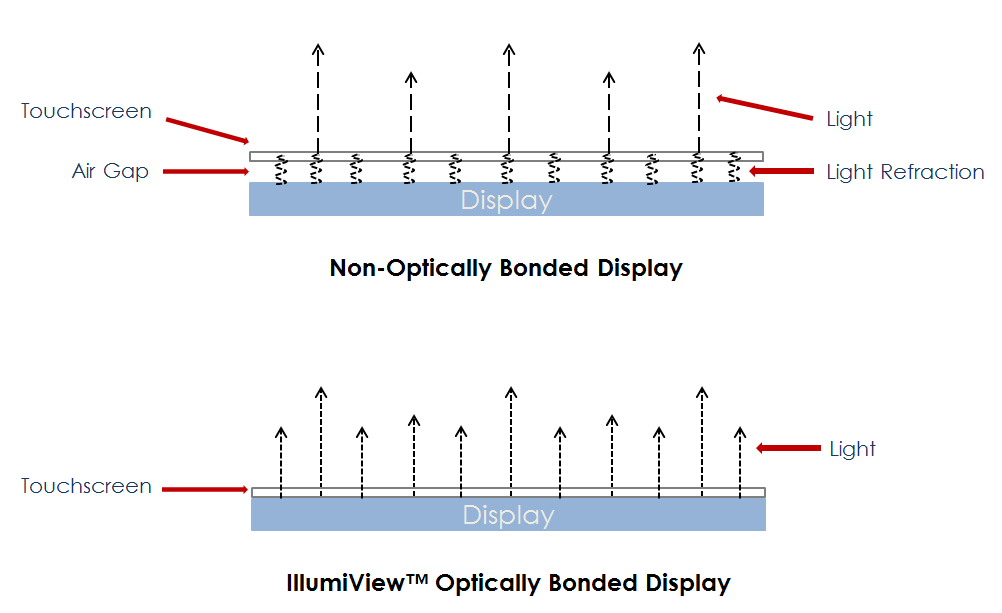
Optically bonded display vs non-optically bonded display

To optically bond the display, we needed a cleanroom in order to keep out any dust and particles from the bonding process.

Continue reading more about the Archer2 HERE on the Juniper Systems Blog.

You can follow Juniper Systems on Twitter @JuniperSystems

Filed Under: Hardware Tagged With: Articles, hardware, The Technology Behind the Archer 2’s Extra-Bright IllumiView Display

About Editor

Glenn is a geographer and a GIS professional with over 20 years experience in the industry. He's the co-founder of GISuser and several other technology web publications.

Top Press

The Global Expansion of Aueshah: A New Era of High Jewelry

April 11, 2026 By GISuser

KARACHI, PAKISTAN. The international luxury market is experiencing a profound shift. Consumers are increasingly rejecting mass-produced goods in favor of rarity, authenticity, and emotional depth. … [Read More...]

State of Data Science Report – AI and Open Source at Work

September 10, 2025 By GISuser

AI and Open Source at Work … [Read More...]

Topcon Announces Landmark Expansion of Topnet Live Network Across USA

January 26, 2025 By GISuser

LIVERMORE, Calif.---Topcon Positioning Systems has announced a significant expansion of its Topnet Live reference station network, introducing 200 new geodetic stations strategically positioned across … [Read More...]

Space Flight Laboratory (SFL) Announces Launch and Deployment of NorSat-4 Maritime Monitoring Microsatellite

January 19, 2025 By GISuser

Seventh Satellite Developed by SFL for Norway … [Read More...]

HERE and BMW Group extend partnership on AI-powered mapping system

January 8, 2025 By GISuser

HERE and BMW Group extend partnership on AI-powered mapping system for automated driving and enhanced road safety … [Read More...]

Everest Base Camp Helicopter Tour, Helicopter Return Trek, and Manaslu Circuit Trek: Which Nepal Adventure Is Right for You?

November 6, 2026 By GISuser

Almost everyone planning a Nepal trip runs into the same wall. You want the big mountains, you have a fixed number of days, and every itinerary you read seems to promise something … [Read More...]

SFL Missions Inc. Confirms Successful Deployment of Six HawkEye 360 Radio Frequency Detection Satellites with Advanced Capabilities

October 27, 2026 By GISuser

MĀHIA, New Zealand, 26 October 2026 – SFL Missions Inc. today confirmed the successful deployment of six radio frequency (RF) detection and geolocation satellites for HawkEye 360 … [Read More...]

Canadian-Built RoadEng 12 Uses AI to Find the Best Location for New Resource and Rural Roads

October 17, 2026 By GISuser

Vancouver, BC, Canada, October 15, 2026 – North Vancouver-based Softree Technical Systems today released RoadEng Version 12, used in more than 75 countries to locate and design … [Read More...]

Beyond the Map: How AI Image and Video Generation Is Changing Geospatial Communication

October 14, 2026 By GISuser

Ask anyone who has shipped a GIS project what the hardest part was, and the answer is rarely the spatial analysis. It is almost always the communication. A site suitability … [Read More...]

From Maternity to Everyday Wear: Building a Wardrobe That Grows With You

October 14, 2026 By GISuser

When I think about maternity clothing, I feel the biggest mistake is buying too many things at once. During pregnancy, your body keeps changing, and something that fits well today … [Read More...]

Copyright gletham Communications 2015 - 2026

Go to mobile version